Business · Accounting workspace
Connect bank movements to the invoices that explain them.
Import a supported bank statement, review the parsed movements and justify them against the right invoice, Peppol document or supporting file. Keep unmatched items visible and prepare a more useful handover to your accountant.
For a company that needs to explain cash movements as well as issue invoices. This workflow adds transaction evidence and matching to ordinary invoice settlement; it does not replace your accountant’s bookkeeping or tax work.
Compare plansHow the workflow works
Import and inspect the bank file
Choose a supported export from the bank and inspect the detected format, account, currency, dates, amounts and duplicate report before saving. Supported parser families include CODA, CAMT.053, MT940, OFX and supported CSV layouts; check your actual bank export.
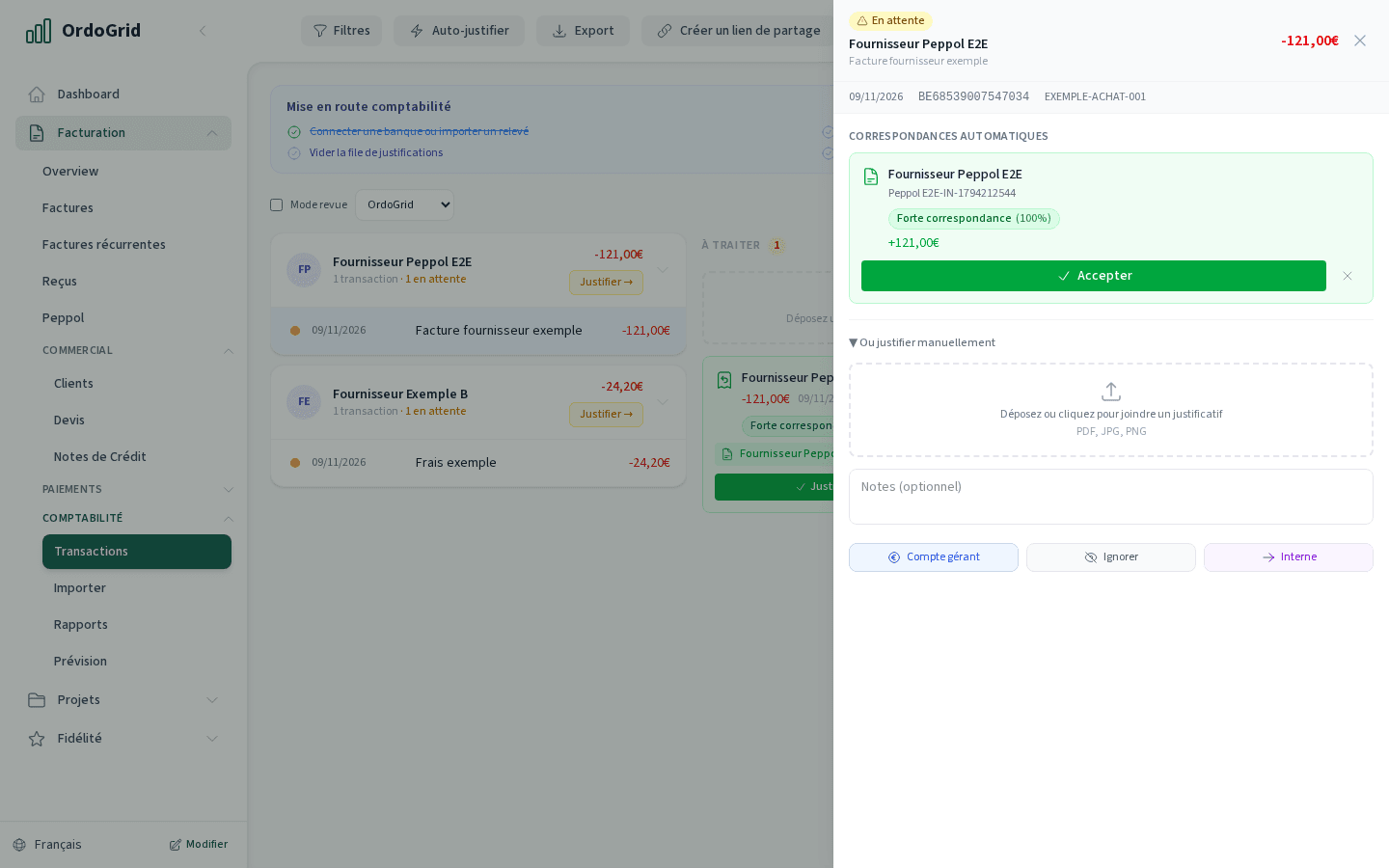
Review suggested matches
Compare reference, counterparty, amount and invoice balance. A suggested match is evidence to inspect, not a promise that the transaction belongs to that document. Keep uncertain movements unresolved.
Justify the actual allocation
Link the transaction to the matching invoice or other available evidence. When a receipt covers several invoices, review each allocation. A justified invoice receipt can create its payment movement; do not add it again manually.
Prepare the accountant’s package
Filter the period and inspect remaining questions. Export the appropriate CSV/ZIP package or use the private-sharing workflow. Inspect original statement files separately: their content can be broader than the selected transaction rows.
Worked example
One receipt covers two invoices
The two allocations add up to the receipt. Check both document references and existing payments before confirming. If the reference does not explain the split, ask the payer and leave the question open.
- Bank receipt
- €1,210.00
- Allocation to invoice A
- €726.00
- Allocation to invoice B
- €484.00
- Unallocated after review
- €0.00
Decide with the limits in view
- A filename extension does not guarantee that every bank layout parses correctly. Review the preview and diagnostic before saving movements.
- Matching and justifying transactions do not execute payments or replace accounting review. Keep source documents and unresolved questions.
- CSV layouts are exports, not verified connectors to every accounting package. Shared originals are an explicit choice and can contain additional transactions.
Before you choose
- Is bank reconciliation included in Starter?
- No. The bank_extracts capability and the Accounting workflow require Business. Manual invoice settlement remains a separate invoice-workspace action.
- Are suggested matches automatically correct?
- No. Check the source movement, document, balance and allocation. The person confirming the match must resolve uncertainty and avoid duplicate payment entries.
- Can my accountant receive the supporting package?
- Business includes the Accounting export and private-sharing workflow for authorised users. Agree the period, files and import method with the accountant first; the handover guide explains expiry and source-file scope.
Continue with the practical guides
Read the relevant guide for detailed steps and dated references.
Inside the application